
Chattr
Open-Source, Self-Hosted Support Chatbot
An open-source, self-hosted support chatbot for docs, support, and customer questions on any website. Add a single script tag, connect your content, and launch a branded assistant with RAG, guardrails, and multi-tenant control.
Project Details
I built Chattr to explore what it actually takes to ship a practical support chatbot for real websites, not just a polished demo. The project combines a Hono API, an embeddable vanilla TypeScript widget, retrieval powered by SQLite and sqlite-vec, configurable guardrails, and a multi-tenant architecture so one deployment can power multiple branded assistants. Teams can scrape their site or ingest documents, stream grounded answers with source links, localize the experience in English or Dutch, and self-host the stack with their preferred model provider, including Ollama for fully local setups.
Results & Impact
Released Chattr
As an open-source, MIT-licensed, self-hosted support chatbot for docs, support, and customer questions
Shipped a one-script embeddable chat widget
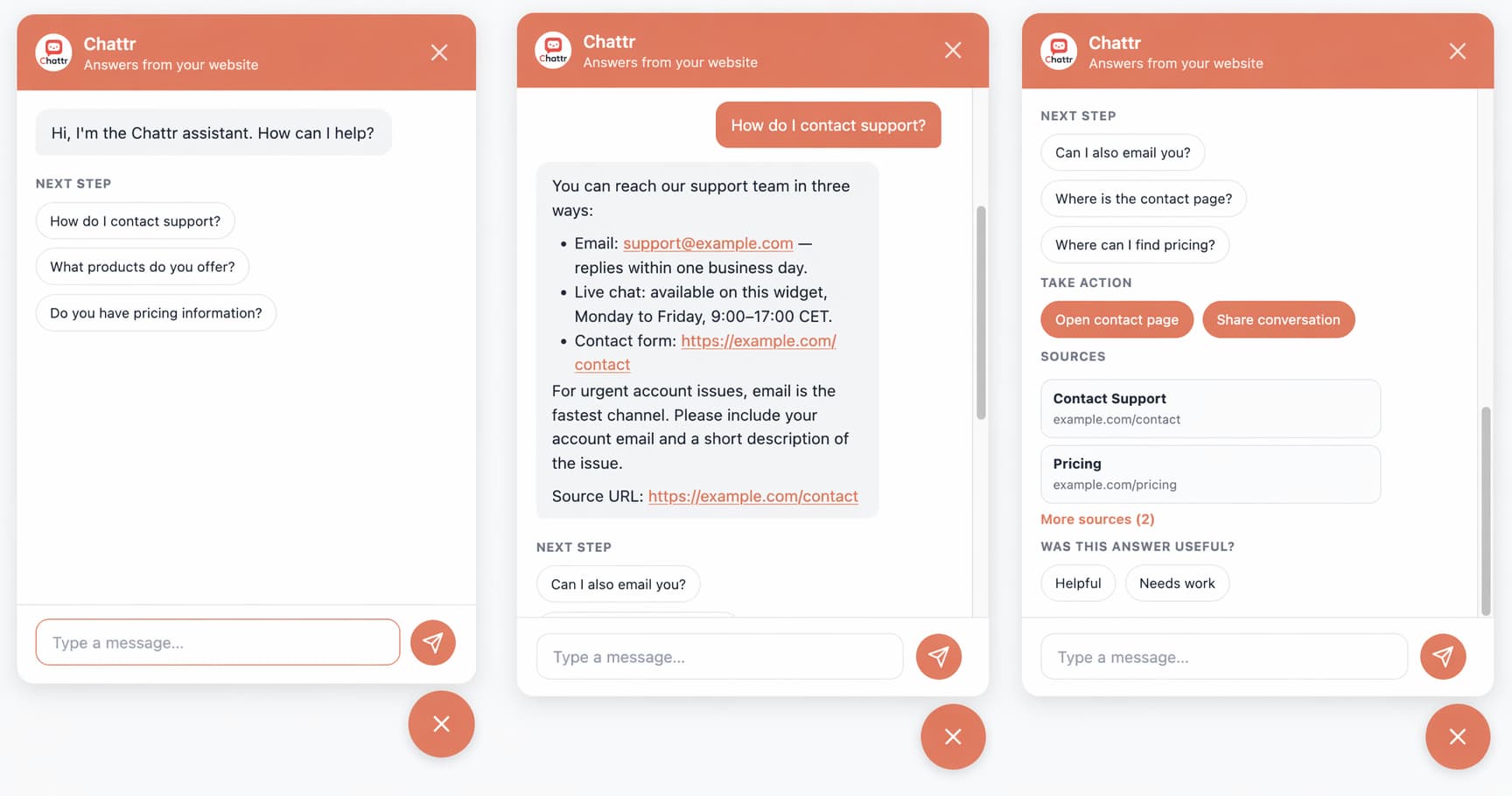
With tenant-aware branding, starter questions, and streamed responses
Retrieval on SQLite
And sqlite-vec, avoiding the need for a separate vector database while keeping self-hosting lightweight
A multi-tenant architecture
With isolated databases, prompts, guardrails, escalation flows, and allowed origins per tenant
Sitemap-driven scraping
And local document ingestion to turn existing site content into a searchable knowledge base quickly
Guardrails
For prompt-injection detection, topic controls, rate limiting, output filtering, and system-prompt leak prevention
Improved support reliability
With confidence scoring, source citations, follow-up suggestions, and safe handoff flows for low-confidence answers
Multiple providers including OpenAI
Anthropic, Azure OpenAI, and Ollama, including fully local setups
Streamlined adoption
With onboarding and Docker-based self-hosting flows that take teams from install to working assistant quickly
Challenge to Solution
What had to be solved
Build an embeddable support chatbot that is genuinely production-friendly: easy to launch with a single script tag, grounded in real site content, safe enough for customer-facing use, flexible across model providers, and able to serve multiple brands from one deployment without content or configuration leaking between tenants.
How it came together
Chattr uses a config-driven multi-tenant architecture where each tenant gets its own SQLite vector database, system prompt, branding, escalation settings, allowed origins, and guardrails.
Content can be ingested from local files or sitemap-driven scraping, chunked and embedded into sqlite-vec, then retrieved with reranking, confidence scoring, and source deduplication at chat time. The server streams answers through the Vercel AI SDK, while input and output guardrails handle prompt-injection checks, topic restrictions, rate limits, content filtering, and system-prompt leak detection. A lightweight widget bootstraps from the server, inherits tenant branding, supports starter questions and feedback, and can be embedded on any site with one script tag.
Product in Use
Key Features
Embed on any site
With a single script tag
Scrape websites or ingest local files
Into a searchable knowledge base
Stream grounded answers
With source links and retrieval confidence
Support tenant-specific branding
Prompts, escalation flows, and guardrails
Run multiple branded assistants
From one deployment with isolated SQLite databases
Include prompt-injection detection
Rate limiting, topic restrictions, and output filtering
Support English
And Dutch UI and response guidance
Collect answer feeßdback
With thumbs up/down and reason tracking
Work with OpenAI
Anthropic, Azure OpenAI, and Ollama
Self-host
With Docker and use onboarding flows for quick setup